

Auto-Detect Medical Codes:
Find ICD-10 and CPT Codes on Any Web Page Instantly
Every ICD-10 and CPT code on your screen — highlighted amber, hoverable, and showing payment data. No searching, no typing, no tab switching. The code comes to you.
The Short Version
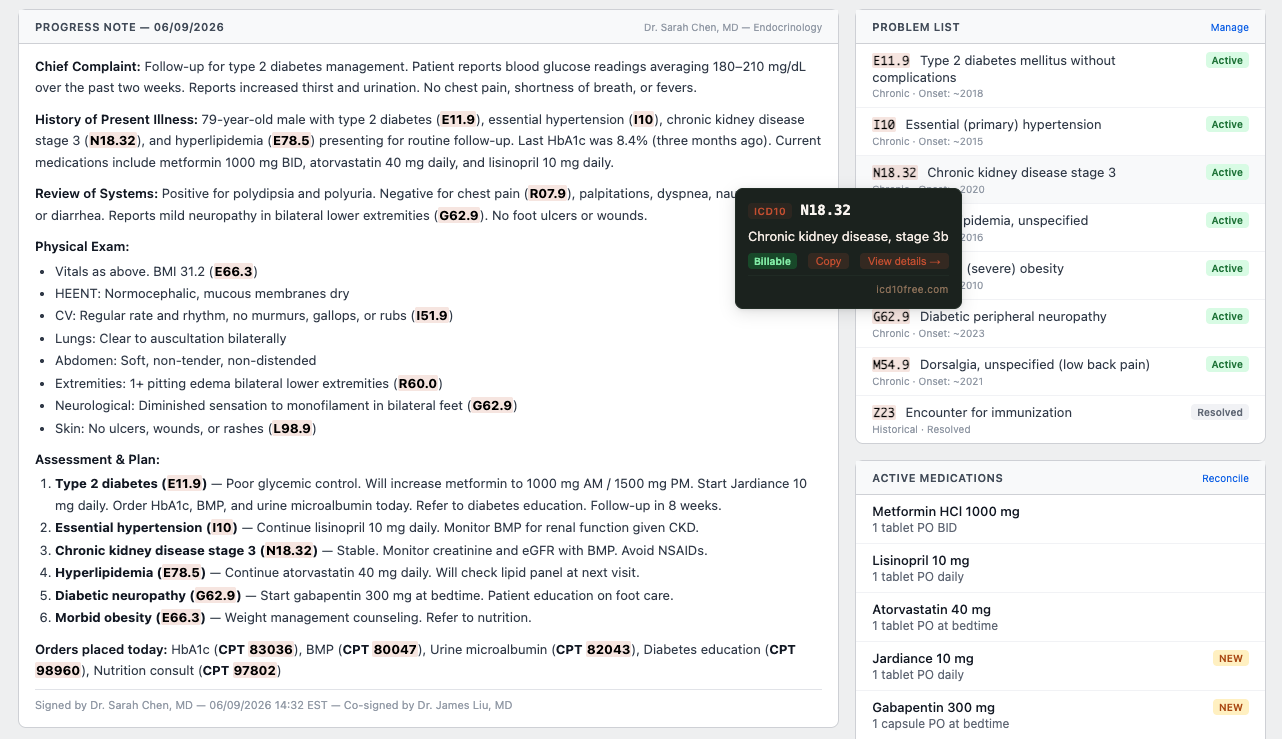
The icd10free Chrome extension automatically detects medical codes on any webpage you visit — EHR notes, CMS coverage policies, medical journals, hospital chargemasters. Every ICD-10, CPT, and HCPCS code is highlighted with an amber background the moment the page loads.
Hover any highlighted code and a tooltip shows you the code description, billable status, and average Medicare payment. Copy it with one click or open it in the side panel for deeper research. The scanning is automatic, the lookup is instant, and you never leave the page you're reading.
100+
Codes Detected Per Second
ICD-10 + CPT + HCPCS
Code Formats Supported
2 sec
Time Per Code Verification
100%
Free. No Account.
The Hidden Work of Finding Codes
Every coder I know does the same thing when they open a chart: scan the text manually for code patterns. E11.9, I10, 99213 — your eyes do regex before your brain does coding. It's automatic, but it's work. And when you're scanning a dense progress note with a dozen diagnoses, procedures, and lab codes scattered across paragraphs, it is easy to miss one.
I once missed a secondary diagnosis of N18.32 (chronic kidney disease, stage 3a) buried in the assessment section of a progress note. It was there — plain text, readable, billable. But between the HPI, the review of systems, and the lab table, I just didn't see it. The claim went out without it. A month later, the denial came back for insufficient specificity on the diabetes code. The missing CKD code would have supported medical necessity.
This is not a skill issue. The human brain is not built to pattern-match thousands of codes across dozens of charts while also assessing medical necessity, checking NCCI edits, and verifying modifiers. Pattern matching is what computers do best. Let the extension scan. You do the thinking.
How Auto-Detection Works
The Extension Scans Every Page You Visit
Once installed, the extension runs a set of medical code patterns against any webpage you open — looking for ICD-10-CM (E11.9, I10, N18.32), CPT (99213, 93000), and HCPCS codes. It reads only visible content, skipping navigation bars, buttons, and hidden elements.
Every Code Is Highlighted Amber
Every match gets an amber background highlight — the same color medical coders associate with review, attention, and verification. The highlights are subtle enough not to distract but visible enough that you instantly see every code on the page without scanning manually.
Hover Any Code for Instant Details
Hover over any highlighted code and a tooltip appears with the code name, billable status (green checkmark), and average Medicare payment. The tooltip follows your cursor — you don't need to click or navigate away from what you're reading.
Copy or Search With One Click
Each tooltip has a 'Copy' button that copies the code to your clipboard — no selecting, no right-clicking, no highlighting. It also has a 'View details' link that opens the side panel with the code pre-loaded, so you can drill into chapters, payment data, and related codes.
Where Code Detection Saves the Most Time
Tips from the Trenches
Three things I've learned about working with auto-detection in the real world.
You Can Disable Detection on Specific Sites
Code detection is on by default, but you can disable it on specific websites from the extension settings. For example, if you use an internal coding tool that already highlights codes, you can turn off detection for that domain while keeping it active everywhere else. You can also toggle hover tooltips independently — keep detection on, tooltips off, or vice versa.
Detection Is Reliable but Not Perfect — Always Verify
The detection regex is carefully tuned to match real ICD-10, CPT, and HCPCS patterns while avoiding false positives (like 'E11' in an email address or '99213' in a ZIP code). But no detection system catches everything. Rare codes, malformed entries, or codes embedded in images won't be highlighted. Use detection as a safety net, not a replacement for your own scanning.
Pair Detection With Bookmarks for a Seamless Workflow
Detection finds the codes. Tooltips show you the basics. When you find a code you use frequently, click the star on the tooltip or in the detected codes panel to bookmark it. Over time, your bookmark folders become a personalized reference library built from the codes you actually encounter — not a textbook list.
Frequently Asked Questions
What coders ask when they first see auto-detection in action.
Ready to Stop Scanning for Codes?
Let the extension find the codes. You focus on what they mean. Free, no account, no limits.