
Turn Clinical Notes Into Clean CMS-1500 Claims:
Without the Spreadsheet Tango
Pasting codes from a spreadsheet into a CMS-1500 form is error-prone, slow, and frustrating. Your clinical notes should be the only input.
The Short Version
The Medical Bill Generator on icd10free.com takes a clinical note — progress note, operative report, H&P, discharge summary — and extracts the ICD-10 and CPT codes automatically. You review the extracted codes, verify them against payment data in the extension side panel, and export a clean CMS-1500 claim form.
No spreadsheets. No manual code entry. No copying and pasting between six browser tabs. Paste the note, review the codes, generate the claim. The tool is free, requires no account, and works with any clinical narrative format.
1
Input Source (Clinical Note)
3
Export Formats
AI
Code Extraction
100%
Free. No Account.
The Spreadsheet Problem
I have watched coders create CMS-1500 claims the same way for twenty years. Open the clinical note in one window. Open a spreadsheet in another. Type the codes into the spreadsheet. Copy the code list. Paste it into the claim form. Double-check the DX/PT pairings. Submit. Repeat 20 times per day.
Every step in that chain is an opportunity for a typo. Transposing digits on a CPT code. Copying the wrong DX code because two diagnoses start with the same number. Forgetting a modifier. Misaligning the DX/PT pointers. The spreadsheet tango — as I have come to call it — is the most error-prone part of the coding workflow, and it is entirely unnecessary.
The clinical note already contains all the information you need. The diagnosis codes are in the assessment. The procedure codes are in the plan. The modifier justification is in the narrative. Extracting them and arranging them into a CMS-1500 is pattern-matching work that computers are better at than humans. Let the AI do the extraction. You do what you are best at: verifying that the codes tell the right clinical story.
How the Medical Bill Generator Works
Paste the Clinical Note
Open the Medical Bill Generator on icd10free.com and paste the clinical note — progress note, H&P, discharge summary, operative note, or consult report. The tool reads the free-text narrative and identifies the diagnoses, procedures, and relevant clinical context. No formatting required — paste as-is from the EHR.
AI Extracts and Validates Codes
The AI identifies all ICD-10 and CPT codes in the note, extracts them with their corresponding descriptions, and cross-references them for validity. It flags potential issues — code conflicts, unspecified codes, or mismatched DX/PT pairings — so you can verify before generating the claim.
Verify With Payment Data
Before generating the CMS-1500, check each code against the icd10free code browser or the extension side panel. Confirm the payment amount, check the code status (active for the current year), and verify the code description matches the procedure documented. This verification step is where most errors are caught — and it takes 30 seconds with the side panel open.
Export a Clean CMS-1500
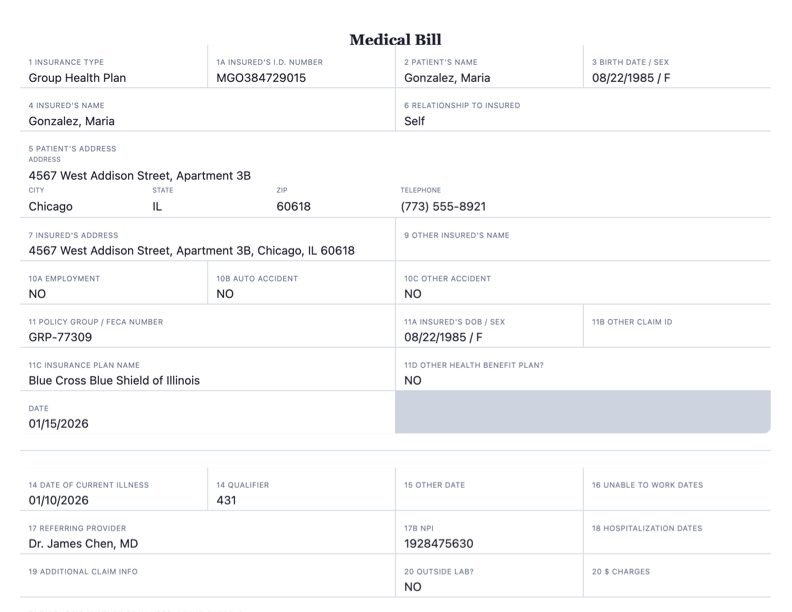
The tool generates a structured CMS-1500 claim with all the extracted codes, patient information, and provider details organized by box. Download as Markdown, HTML, or PDF. The output is ready to submit or attach to your clearinghouse upload — no spreadsheet copy-paste, no manual transcribing from notes.
Real Claim Generation Scenarios
Tips from the Trenches
Three things I have learned about generating clean CMS-1500 claims from clinical notes.
Always Verify the AI's Code Selections Before Generating the Claim
The Medical Bill Generator is excellent at pattern matching — it finds codes in notes faster than any human. But it does not have access to the full clinical context, the provider's intent, or the specific payer rules. I always review the extracted codes before generating the CMS-1500. Check that every extracted DX is supported by the clinical documentation. Remove any codes that were listed in the differential but ruled out. Add any codes the AI missed. The tool is a force multiplier for your expertise, not a replacement for it.
Use the Side Panel to Catch Code Conflicts Before Submission
The fastest way to verify extracted codes is with the extension side panel open while you review the generated codes. Search each CPT code to confirm the description matches the procedure. Check the payment data to make sure it is not a code you would typically undercode. If the AI extracted 99213 but the MDM sounds like 99214, the payment difference ($39.85) is your flag to review the documentation again. The side panel makes this a 10-second check per code.
Build a 'Common Claim Errors' Bookmark Folder
Every coder has code pairs they frequently need to verify — 29881/29877 modifier checks, 99213/99214 leveling tips, common E/M + procedure pairs. Bookmark these in the extension so they are one click away when you are reviewing the AI-generated CMS-1500. Over time, your bookmark folder will reflect exactly the edge cases that matter to your specialty.
Frequently Asked Questions
What coders ask about using AI to generate CMS-1500 claims.
Ready to Generate a Clean CMS-1500?
Paste a clinical note, review the extracted codes, and download your claim. Free, no account, no limits.