

ICD-10 Specificity:
Laterality, 7th Characters, and Excludes Notes Explained
Using an unspecified code when a specific one exists is the fastest way to get a denial. Here is how to nail specificity every time.
The Short Version
ICD-10 specificity is the single most important factor in clean claim submission. Every code has a defined level of specificity — some require laterality (right vs left), others require a 7th character (initial vs subsequent encounter), and many have Excludes notes that tell you which codes can and cannot be paired together.
This guide covers the three specificity rules that trip up coders most often: laterality, 7th characters, and Excludes1 vs Excludes2. Use the icd10free code browser to verify specificity before every submission — search any code to see its full descriptor, chapter structure, and includes/excludes notes.
1,3, 2
Right, Left, Bilateral
A, D, S
7th Character Codes
Excludes1
Do Not Code Both
Excludes2
May Code Both
Why Specificity Matters
I once audited a practice where 35% of the diagnosis codes submitted to Medicare were unspecified. Diabetes without complications (E11.9). Hypertension (I10). Osteoarthritis of the knee (M17.9). Each code was technically valid — but each one was less specific than the documentation allowed. The practice was leaving specificity on the table, and every unspecified code carried the risk of a medical necessity denial.
Payers look at specificity for a simple reason: they cannot determine medical necessity from a vague code. 'Unspecified diabetes' does not tell the payer whether the patient has renal complications, ophthalmic complications, or neither. 'Unspecified osteoarthritis of the knee' does not say which knee or whether it is primary or secondary. When a payer sees an unspecified code, their options are to deny the claim, request additional documentation (delaying payment), or pay it and flag it for post-payment audit.
The CMS 2026 guidelines continue the decade-long push toward specificity. The message is clear: if a specific code exists, use it. If the documentation does not support it, improve the documentation. Unspecified codes should be the exception reserved for the rare case where the clinical picture genuinely lacks the detail for a more specific code.
How to Verify ICD-10 Specificity
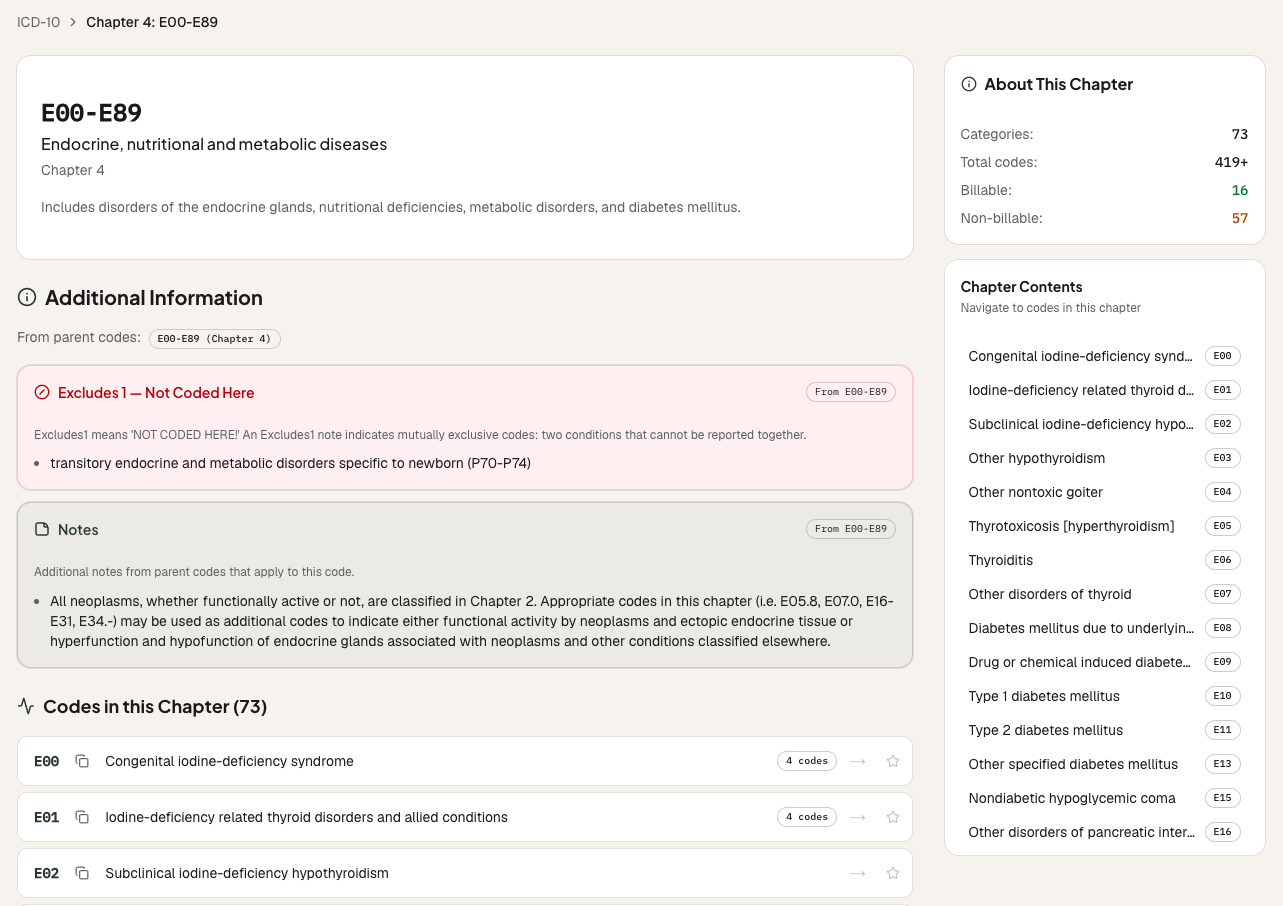
Check Laterality First
ICD-10 uses the sixth character for laterality in many musculoskeletal, eye, and ear codes. 1 = right, 2 = left, 3 = bilateral. For example, M17.11 (unilateral primary osteoarthritis, right knee) vs M17.12 (left knee). If the condition is bilateral but the documentation only specifies one side, query the provider. If the side is not documented, you may need to use the unspecified code (e.g., M17.10) — but only as a last resort.
Apply the Correct 7th Character
Many ICD-10 codes in Chapter 19 (Injury, Poisoning) and Chapter 20 (External Causes) require a 7th character extension that describes the episode of care: A (initial encounter), D (subsequent encounter), or S (sequela). Using the wrong 7th character — or omitting it — is a guaranteed denial. For example, S82.001A (fracture of right patella, closed, initial encounter) vs S82.001D (subsequent encounter).
Respect Excludes1 vs Excludes2 Notes
Excludes1 means 'do not code both' — the two conditions cannot occur together (e.g., congenital vs acquired absence of a body part). Excludes2 means 'may code both if both exist' — the two conditions are related but can coexist (e.g., diabetes with foot ulcer). Using the icd10free Excludes Checker, you can test whether your code pair has a conflict before submitting the claim.
Use the Code Browser to Verify Specificity
Open the icd10free code browser at /diagnoses and navigate to the code you're considering. The code detail page shows the full descriptor, the chapter structure, the includes and excludes notes, and the Medicare payment data. If the code has laterality or 7th character requirements, you will see them listed. Use the browser as your specificity checklist before every submission.
Real Specificity Scenarios
Tips from the Trenches
Three things I have learned about ICD-10 specificity from audits and denial reviews.
Unspecified Codes (XXX.X) Should Be the Exception, Not the Rule
I have audited records where 40% of diagnosis codes were unspecified. Every unspecified code is a denial risk. Payers increasingly auto-deny unspecified codes for certain conditions (diabetes, hypertension, CKD). The CMS 2026 guidelines continue the push toward specificity. If the documentation does not support a specific code, query the provider. If you cannot get the specificity, document why in the record — 'laterality not specified in clinical note, no further detail available' — so the audit trail is clear.
Use the Code Browser as Your Specificity Checklist
Before you submit a diagnosis code, search it in the icd10free code browser. The code detail page tells you: the full descriptor with all specificity requirements, the chapter and category, the includes and excludes notes, and the payment data. It also shows the parent code and child codes — letting you verify that you have chosen the most specific code available. I train coders to do this as a two-second habit before every claim.
Build a 'Common Specificity Mistakes' Bookmark Folder
Every coder has codes they get wrong. Maybe it is M17.1 vs M17.0 (laterality on osteoarthritis), or S82.001A vs S82.001D (7th character on fractures). Create a folder in the extension called 'Specificity — Watch List' and bookmark the codes you or your providers frequently miss. Review the folder before each shift. After two weeks, the pattern will be internalized — and the bookmarks become a record of how your coding accuracy improved.
Frequently Asked Questions
What coders ask about ICD-10 specificity and denial prevention.
Ready to Verify Your Code Specificity?
Search any ICD-10 code in the browser to see its full descriptor, laterality requirements, 7th character options, and includes/excludes notes.