

Organize Medical Codes Like a Pro:
Bookmarks, Folders, and Quick Access
Stop saving ICD-10 codes in sticky notes, browser bookmarks, and spreadsheets. A dedicated medical code bookmarking system with color-coded folders — accessible from your side panel and the web app.
The Short Version
The icd10free Chrome extension includes a bookmark system built for medical coders. Create folders for each specialty, department, or facility you code for. Save codes with one click from search results, detected code tooltips, or the web app. Each folder gets an auto-assigned color so you can find what you need at a glance.
Bookmarks live in your side panel and on icd10free.com — save from either place, access from both. No more sticky notes, no more spreadsheets, no more Cmd+T every time you need to find a code you use every single day.
Unlimited
Folders and Bookmarks
8
Auto-Assigned Colors
2 clicks
To Save Any Code
100%
Free. No Account.
The Sticky Note Problem
I once walked into a coding office and saw three monitors, a filing cabinet, a dry-erase board — and twenty sticky notes plastered along the bottom of the main monitor. Each one had a code written on it. E11.9. I10. 99213. 93000. The coder explained: 'These are the ones I use every day, so I keep them where I can see them.' She was a professional with fifteen years of experience, and she was organizing codes with Post-its.
That is where medical coding organization sits today. Browser bookmarks (wrong tool — they're for URLs, not codes). Spreadsheets (better, but disconnected from your lookup workflow). Physical notes (lost, damaged, unsearchable). Or memory — the most common system of all — which fails you at exactly the moment you need it most: when you're under time pressure, the chart is complex, and you're one denial away from a bad day.
A dedicated code bookmarking system does what sticky notes and spreadsheets cannot: it connects your personal code reference directly to your lookup workflow. Save a code while searching the side panel. Access it from the same panel five minutes later. Across days, weeks, and months, you build a reference library that remembers what you use — so your brain can focus on what the codes mean, not where you put them.
How Bookmark Folders Work
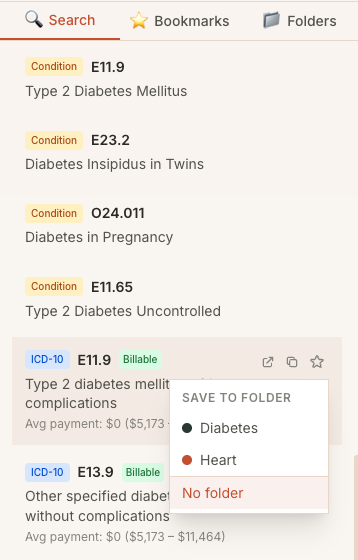
Create Folders for Your Specialty Areas
In the bookmarks tab of the side panel, click 'New Folder' and give it a name — 'Cardiology — Top 50', 'Ortho — Frequent Codes', 'ED — Common DX'. The extension assigns a color automatically so every folder is visually distinct at a glance.
Save a Code in One Click
Whenever you find a code you use often — in search results, on a detected code tooltip, or on icd10free.com — click the star icon. A popover appears showing your folders. Pick the right folder and the code is saved with a timestamp. Two clicks, done.
Stay Organized With Color Labels
Every folder gets a unique color dot — blue for cardiology, green for orthopedics, amber for ED. Colors are automatically assigned so no two folders share a color. At a glance, you can spot the folder you need without reading labels.
Access From Side Panel or Web App
Your bookmarks are available in the side panel's bookmarks tab and on every code page on icd10free.com. Save a code from the web app and it appears in your extension. Save from the extension and it's there when you visit the web app. No sync, no export, no duplication.
Ways Coders Use Bookmark Folders
Tips from the Trenches
Three things I've learned about building a personal code reference library.
Use Folders Like a Playlist, Not a Filing Cabinet
The coders who get the most out of bookmark folders treat them like curated playlists, not archival storage. A folder with 20 codes you actually use is more valuable than a folder with 200 codes you saved once and never looked at again. I recommend keeping folders under 50 codes. When a folder gets too big, split it — 'Cardiology — DX' and 'Cardiology — Procedures' instead of one massive folder.
Bookmark Problem Codes — Not the Ones You Already Know
There's a natural tendency to bookmark codes that seem important even though you already know them by heart. Don't. Bookmark the codes you get wrong, the ones you hesitate on, the ones that have tripped you up before. A bookmark folder of 15 problem codes that you review before a shift will prevent more denials than a folder of 100 codes you already know.
Combine Search and Bookmarks for Rare Codes
When you encounter a code you've never seen before, search it in the side panel first. Read the description, check the payment data, look at the chapter notes. Then bookmark it — the act of saving it locks in what you learned. Coders who do this build not just a code list but a personal knowledge base of the rare codes that cross their desk once a quarter.
Frequently Asked Questions
What coders want to know about moving from sticky notes to digital bookmarking.
Ready to Ditch the Sticky Notes?
Start building your personal code reference library today. Free, no account, no limits.