Stop Tab-Switching:
How a Medical Coding Chrome Extension Saves You 2 Hours a Day
Every tab switch costs you 15–25 seconds of cognitive reorientation. At 50 lookups per day, that’s 40–100 minutes of pure context-switching time. A Chrome extension puts your code lookup, payment data, and bookmarks in a side panel — right next to your EHR. No tab switching required.
The Short Version
The icd10free Chrome extension puts everything a medical coder needs — ICD-10 search, CPT lookup, Medicare payment data, code detection, hover tooltips, and bookmark folders — into a side panel that lives beside your EHR. You never leave your chart to look up a code.
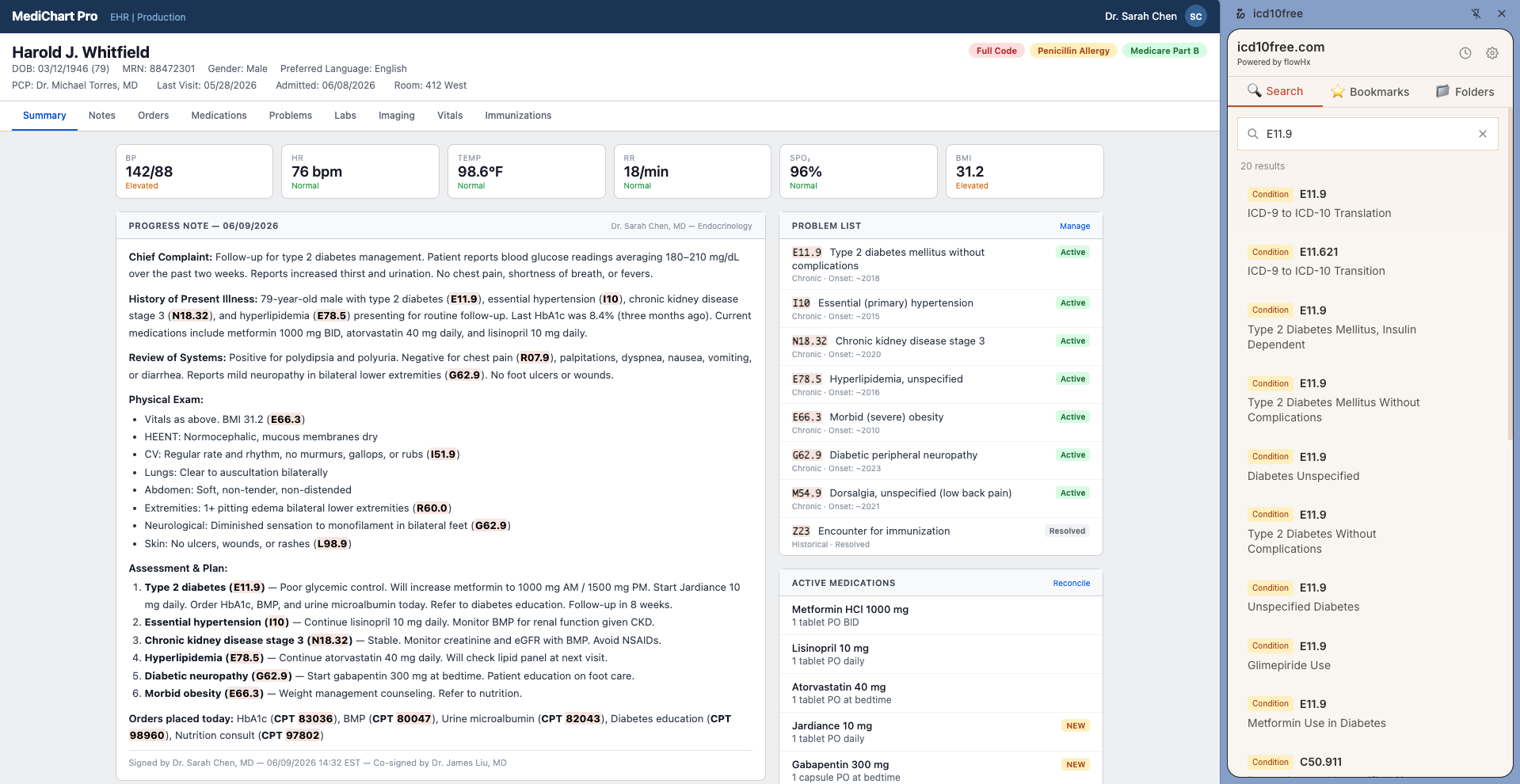
It works on any webpage in Chrome: Epic, Cerner, Athena, CMS websites, chargemasters, medical journals. Install it, open the side panel with Cmd+Shift+O, and search codes without opening a single new tab. For detected codes, just hover and the information comes to you.
800–1,200
Daily Tab Switches Saved
40–100 min
Context-Switching Time Recovered
2 sec
Average Lookup Time
100%
Free. No Account.
The Tab-Switching Problem
I once watched a coder look up eight diagnoses for a single chart. She opened the EHR, noted E11.9, switched to a browser tab, typed it, read the description, switched back to the chart, scrolled to the next code, switched to the browser, typed it — sixteen tab switches for eight codes. At 50 charts a day, that's 800 tab switches. Every single day.
The research is clear: switching between cognitively demanding tasks costs 15–25 seconds per switch, not the 2–3 seconds it takes to physically click a tab. Your brain has to reorient — where am I, what was I doing, what's the next step. Over 800 switches, that adds up to 40 to 100 minutes of pure lost time every day. Time you spend context-switching instead of coding.
This is not a discipline problem. It's not about being more focused or better organized. It's a tool problem. When your lookup tool lives in a different tab — or a different website or a different application — you are forced to switch. The only way out is to eliminate the switch itself.
How a Medical Coding Chrome Extension Works
Install the icd10free Chrome Extension
Visit the Chrome Web Store, click 'Add to Chrome', and the extension installs in seconds. No account creation, no email sign-up, no credit card. Pin it to your toolbar so it's always one click away.
Open the Side Panel
Press Cmd+Shift+O (Mac) or click the extension icon and select 'Open side panel'. A dedicated panel slides into view on the right side of your browser — next to your EHR, not covering it. Cmd+Shift+K jumps directly to the search box from any tab.
Search Without Leaving Your Chart
Type an ICD-10 code like E11.9 or a CPT code like 99213 in the search box. Results load instantly with the code name, Medicare payment data, and billable status. No new tab, no second monitor — it's right there beside your clinical notes.
Hover for Instant Verification
The extension auto-detects every medical code on your screen — highlighted in amber. Hover any highlighted code and a tooltip appears with the code name, average Medicare payment, and a copy button. Two seconds, no clicking required.
Bookmark Codes You Use Every Week
Found a code you use frequently? Click the star icon and save it to a color-coded folder. Next time you need it, it's in your bookmarks — not in a sticky note or a spreadsheet you can't find.
Everything in One Panel, Every Time
Search, bookmarks, detected codes, and history — all live in the side panel. Open it once, and it's there for your entire shift. No juggling tabs, no hunting for the right window, no cognitive whiplash.
Real-World Coding Scenarios
Tips from the Trenches
Three things I wish every coder knew about working with a side panel.
Memorize Cmd+Shift+O and Cmd+Shift+K — They're Worth Hundreds of Clicks a Day
Cmd+Shift+O opens the side panel. Cmd+Shift+K jumps directly to the search box. Together, they turn code lookup into a two-keystroke reflex. I tell every coder I train: spend five minutes running these shortcuts until they're muscle memory. It's the highest-ROI five minutes of your day.
The Side Panel Remembers What You Were Doing
Close the side panel and reopen it later — it remembers your last tab. If you were in bookmarks, it opens bookmarks. If you were searching, the search results are still there. Use it as your persistent coding desk that follows you across websites but never leaves the side of your EHR.
Pin the Extension — It's Faster Than Typing the Shortcut
If keyboard shortcuts aren't your thing, pin the icd10free extension to your Chrome toolbar. A single click opens the popup for a quick lookup. Click 'Open side panel' from the popup and the full panel slides in. Pinned icons are always visible, always one click away — no digging through the puzzle-piece menu.
Frequently Asked Questions
Questions I hear from coders who are considering a Chrome extension for the first time.
Ready to Stop Switching Tabs?
No sign-up, no credit card, no upsells. A side panel, code detection, hover tooltips, and bookmark folders — all free.